
Getting Your Email Campaigns to Land in the Inbox Takes Some Doing
Did you know that nearly one in five emails get caught by a spam filter and sent to the spam folder? Aside from the challenge of deliverability, a good subject line is the first step in making sure your email actually gets opened?! Writing a real banger is a bit of an art and a science that requires …
- Putting yourself in your readers’ shoes
- Staying relevant and topical
- Making the most of every character
- Getting creative in all kinds of ways to stand out
In this post we’ve rounded up some of our best advice for writing winning email subject lines, including professional best practices and examples based on subject lines we’ve tested for lots of clients across a broad range of industries.
A Preamble About Spam Filters + Email Deliverability
Before we get specific on subject line dos and don’ts below, it’s important for you to understand the nuances of spam filters and email deliverability. This will help you know exactly how important all of our advice is to follow and give you the confidence to disregard the rules and have a little more fun. (Yes, we know … we haven’t even unloaded the so-called “rules” yet, and we’re already talking about breaking them!)
Sender reputation is the #1 factor impacting your email deliverability, so your subject lines (and overall content) are only likely to get you sent to junk if your reputation is weak.
So here’s the situation: getting your emails to consistently land in the inbox comes down to several key factors, including having a good subject line that avoids common spam trigger words and formatting. Now, once upon a time, so-called spam trigger words and formatting were the biggest factors impacting email deliverability, but things change. These days spam filters actually have bigger fish to fry, like your overall sender reputation, which is impacted by spam complaints more than anything else.
Long story loooong, your subject lines (and overall content) are now only likely to get you sent to junk if your reputation is weak. So, as you experiment with these subject line writing tips in your campaigns, go ahead and use trigger words like ‘free’ and ALL CAPS or other treatments to try to stand out. Monitor inbox placement, and if you see a dip, cut back on sales-y lingo and fancy tactics and fix your underlying reputation issues. Once delivery and engagement are restored, you can get back to pushing the limits with those subject lines.
Tips for Subject Line Supremacy—Here We Go!
Tip 1. Summarize the Content Inside So Subscribers Know What to Expect
Basically, what we’re saying is …
Don’t be misleading.
Do give an honest sneak peek of what’s in store for your readers.
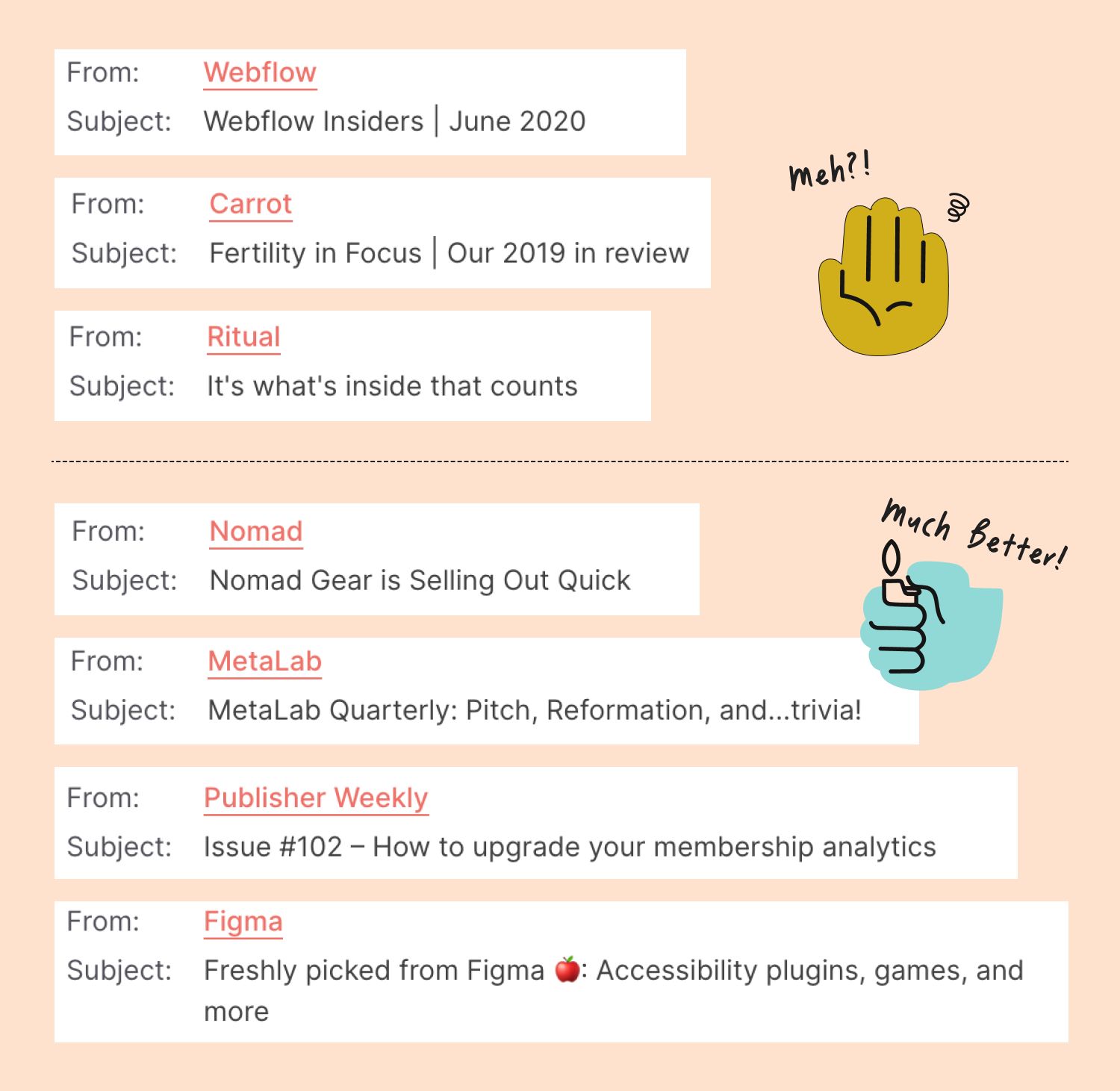
There’s no need to be gimmicky or used car salesman-y (sorry used car salesmen/women?!), but you should try to excite your subscribers, and make sure to put important or time sensitive info up front. When deciding exactly how much information to reveal in your teaser of an email summary, here are some tips within this tip:
- Promoting an event or offer that is time sensitive? Include the time frame or end date so subscribers don’t miss out.
- Discount code inside? Mention its value using whichever number (percent off vs. dollar amount) is larger.
- Sometimes a little mystery is irresistible—try being less specific with offer details to add intrigue.
Tip 2. Keep It Short so It Fits in View (Around 40-70 Characters)
While there’s no one-size-fits-all perfect subject line length, most people view emails on phones and in Gmail, and 40-70 characters ensures a good fit. If your email marketing software provides insights about which devices your subscribers actually use (and it should), take that into consideration. If your audience is almost exclusively on mobile, 40-ish characters will be best—less is more!
Tip 3. Use Emojis, Punctuation + Spacing to Stand Out
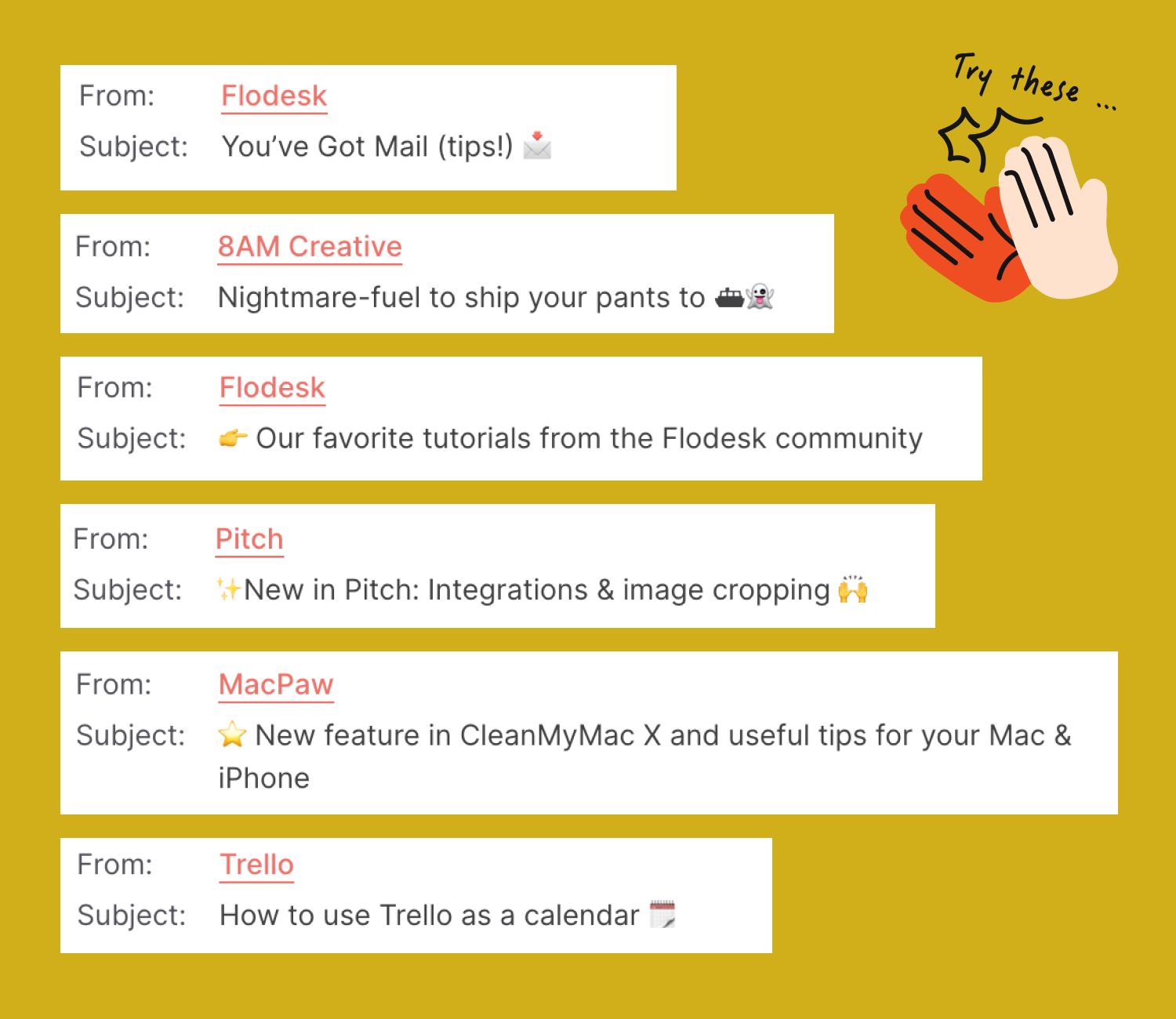
Remember that subject lines are just as much about what they say as how they look. Getting creative with your keyboard can make your subject lines visually stand out in the inbox. This tactic is one that some marketers warn against for spam trigger reasons, so it’s worth testing. As long as your sender reputation is good, none of these ideas should give you trouble.
Take a Less-Is-More Approach With These Style Tweaks
- Try adding extra space between each letter so it’s easy and breezy to read.
- Most advice says to use emojis sparingly (as in no more than one), but in our testing two always performs better. Experiment with these, and have fun.
- All caps used strategically (and again, sparingly) also pack a punch.
- Special characters like &, —, +, etc. can add visual separation as well as reduce your overall character count.
Tip 4. Use Data to Add Personalization
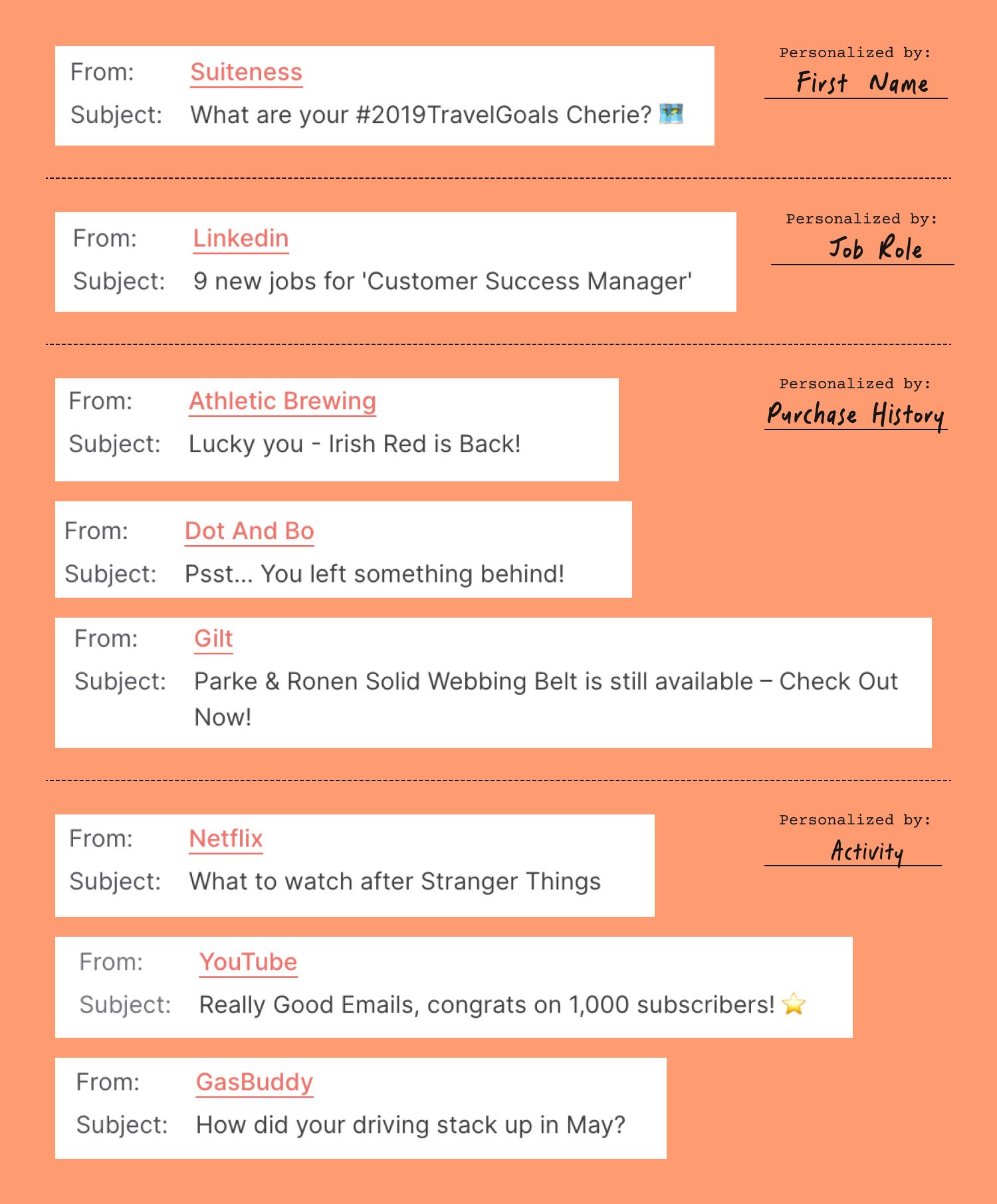
Depending on the kinds of information that you collect about your subscribers, you can personalize your subject lines to add relevance and wow factor for your audience. Things like first names, or company names are common dynamic data to include in subject lines, but you don’t have to (and shouldn’t) stop there. Segmentation and personalization is a whole topic for another day, but keep in mind that you can craft subject lines and email variations specific to each group in your audience—whether they’re near a certain location, have a favorite color, are parents of small children, or work in a particular field or industry.
Tip 5. Avoid Spammy Phrases (i.e. “FREE Money! Details Inside!”)
This might seem like a no-brainer—obviously you know not to use spammy language in your emails! Any subject lines that sound inappropriate, predatory, or give off creepy sales push vibes are gonna raise a flag (thank goodness!), but you might be surprised to learn what kinds of words and phrases actually raise those spam filter suspicions.
Spam Trigger Words to Skip In Your Subject Lines
- Any over-sensationalizing or overpromising lingo (“Completely free” or “F R E E” or “Reverse aging!” or “Refinance—pennies a day!”)
- Too much ALL CAPS or over-punctuation ($$$ or ??? or !!!!!)
- Using percentages over 100 (“Earn up to $10 with a 101% guarantee”)
- Being pushy with click language (“Click here to …”)
- Being too sexy (“XXX” or “Score hot babes!” or “Find singles near you!”)
- Financial and employment terms (“Earn extra cash” or “Credit bureaus” or “Stock Alerts” or even “Be your own boss!”)
Tip 6. A/B Test Variations to Maximize Your Open Rate
We mentioned testing loosely a couple times above, and it’s worth repeating … a lot. If you’ve never run an A/B test when you schedule and send your email newsletters, first, know that skipping this step is limiting your open rate success, and second, know that it truly isn’t that hard or time consuming to pull off! Most EMS tools have some level of subject line testing built in.
Here’s How A/B Testing Works Step-By-Step
- You whip up 2-3 subject line variations worth trying out.
- The tool will send each subject line evenly to a small test group within your list.
- Engagement with each version is tracked over a brief test window.
- The most-clicked subject line gets sent to everyone else on the list for you automagically.
When it comes to email subject line testing, we advocate for the scientific method (i.e. testing one change at a time). If your tests aren’t specific, it’s likely you’ll come back with a clear winner and loser among your variations, but you won’t know the exact reason for the change in performance between them. That means you won’t be able to replicate the formula with confidence, and you’ll need to retest in the future.
Some Testing Pairs to Consider For Your Next Campaign
Emojis: With vs. without emojis / Emoji placement (front loaded vs. at the end) / Quantity of emojis (1 vs. 2 vs. 3)
- “🥁Drumroll, pls 🥁 … Meet our NEW advanced reformulation”
- “🥁🥁Drumroll, pls 🥁… Meet our NEW advanced reformulation”
- “🥁Drumroll, pls … Meet our NEW advanced reformulation”
- “Drumroll, pls … Meet our NEW advanced reformulation”
First Name Personalization: With vs. without dynamic first name / Placement of name token
- “{Christine}, Art Hop is this Friday + your invite is waiting!”
- “Art Hop is this Friday + your invite is waiting”
Capitalization: Title case vs. Sentence case vs. ALL CAPS (proceed with caution on all caps for spam filter safety of course!)
- “BYOB: Build Your Own Brand (Tips + Inspo Inside)”
- “BYOB: Build your own brand (tips + inspo inside)”
Focus on the Positive (or don’t): Lead with solutions or desired outcomes vs. problems and negative results
- “Stop Writing Bad Subject Lines + Landing in Spam”
- “How to Write Great Subject Lines + Increase Your Open Rate”
Urgency: With vs. without day mention / Placement of urgency overall
- “Grab your free email signature with a special offer inside!”
- “Grab your free email signature with a special offer —3 days left!”
- “3 Days left—Grab your free email signature!”
Company Name Drop: With vs. without your business / Placement of business name
- “Get helpful, actionable insights for your site in Google Analytics”
- “Get helpful, actionable insights for your site”
Tip 7. Always Include Preview Text BONUS!
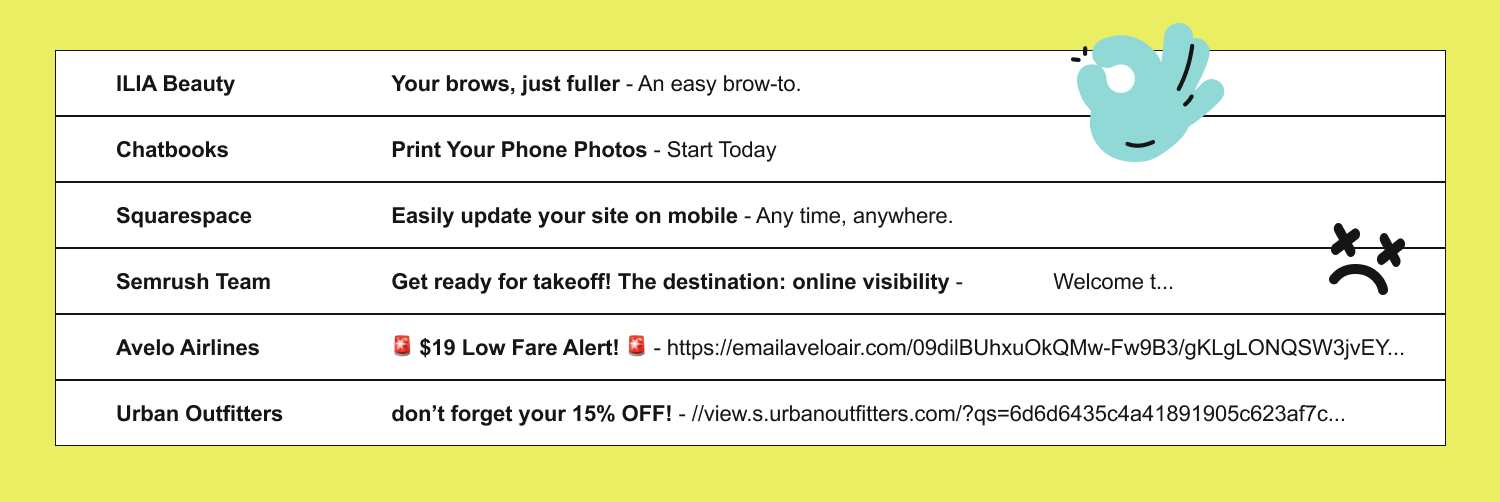
Preview text is the unbolded secondary copy that comes after your subject line in the inbox view. It’s the third thing (besides the sender name and subject line) that a reader sees, and it’s kind of like a mini billboard to build anticipation for your email content inside.
If you forget to add intentional preview text to your sends, a snippet of copy from inside the email will pull into the space. That might sound like a convenient time saver, but it usually results in awkward things like your “View in Browser” link getting prime placement right next to your subject line. See the bottom three samples in the image above?! Not sure about you, but “Having trouble viewing this email?” isn’t really what we want taking up that valuable real estate.